Best English - Gujarati Dictionary on iPhone

English-Gujarati Dictionary – A quick reference guide. Simple, beautiful, elegant and easy to use.
Best Gujarati Dictionary in the market. It has more than 50k English words with Gujarati and English meanings.

Features:
- English to Gujarati
- Gujarati to English
- Use Offline(limited words) 
- Download more words by swiping down the words' list.
- 50k+ Words.
- Word of the Day by notification - Can be disabled from settings.
- Mark word as favorite.
- Word search history.


Best English-Gujarati Dictionary on Android

Best of Gujarati Dictionary on Android

English-Gujarati Dictionary – A quick reference guide. Simple yet beautiful and easy to use.
Download Free Now!

Application ask for download words every-time whenever application is launched, but it download the remaining words(not downloaded) only.

Best English to Gujarati Dictionary in the market. It has more than 25000 English words with Gujarati meanings.

Features:
► Home Screen Widget
► Use Offline - Need to download first.
► 25000+ Words.
► Word of the Day by push notification - Can be disabled from settings.
► Choose font size for reading - Can be configurable from settings.
► Word Search history.
► Word Pronunciation with sound.

Download Now from Google Play

Indian Cooking Recipes on Android


Recipe Book for Android Play Store. Download Now

In it you find very popular recipes that you love.

Recipe Book offers Indian cooks at all skill levels a dynamic and indispensable place to discover and share food.

With very nice features.

0) You can find recipes from your favorite cuisine.
1) New Recipes through updates automatically by notification.
2) Add your recipes to the application.
3) Search option, you can directly filter recipes by name of recipe.
4) You can rate recipes, that help others.
5) All recipes are placed together.
6) Recipe can be tagged as favorites, so that you can filter recipes as and when needed.
7) Notification for new recipes can be disabled from settings.

This Application needs Internet connection to download the recipes. once it download on device afterward you can see any time in offline mode.

Download Now From Google Play

જીવન જીવવાની જડીબુટ્ટી

૧. દરરોજ ૧૦ થી ૩૦ મિનિટ ચાલવા જાઓ અને હા, ચાલતી વખતે ચહેરા પર હળવું સ્મિત હોય તો ઉત્તમ!

૨. દરરોજ ઓછામાં ઓછી ૧૦-30 મિનિટ માટે એકાંતમાં બેસો.

૩. દરરોજ ૭ કલાક ઊંધો.

૪. જોશ, ઉત્સાહ અને કરૂણા આ ત્રણ મહત્વના ગુણો છે જીવનમાં.

૫. નવી રમતો શિખો/રમો.

૬. ગયા વર્ષે કરતાં આ વર્ષે વધારે પુસ્તકો વાંચો.

૭. ધ્યાન, યોગ અને પ્રાર્થના માટે સમય ફાળવો.

૮. ૭૦થી વધારે ઉંમરના અને ૭થી ઓછી ઉંમરના લોકો સાથે સમય ગાળો. દરરોજ શક્ય ન હોય તો અઠવાડિએ.

૯. જાગતાં સપનાં જુઓ.

૧૦.પ્લાન્ટ(ફેકટરી)માં બનતી વસ્તુઓ કરતાં પ્લાન્ટ(છોડ)માં ઊગતી વસ્તુઓને ખોરાકમાં મહત્વનું સ્થાન આપો.

૧૧. પુષ્કળ પાણી પીઓ.

૧૨. દરરોજ ઓછામાં ઓછા ત્રણ વ્યક્તિના ચહેરા પર સ્મિત લાવો.

૧૩. ચર્ચા/નિંદા/કુથલીમાં સમય ન બગાડો.

૧૪. ભૂતકાળ ભૂલી જાઓ. ખાસ કરીને પતિ/પત્નીની ભૂલો. વર્તમાનકાળનો આનંદ લો.

૧૫. રાજાની જેમ સવારનો નાસ્તો કરો, રાજકુમારની જેમ બપોરનું ભોજન લો અને ભિખારી જેટલું રાત્રે જમો!

૧૬. દરેક દલીલની સામે જીતી શકવાના નથી, મતભેદ સ્વિકારી લો.

૧૭. સરખામણી કરવાનું છોડો. ખાસ કરીને પતિ/પત્નીની સરખામણી.

૧૮. તમારા સુખનું કારણ ફક્ત તમે છો.

૧૯. દરેકને માફી બક્ષો. ક્ષમા વીરસ્ય ભૂષણમ્

૨૦. બીજા લોકો તમારા માટે શું વિચારશે એવા વિચાર છોડો.

૨૧. ભગવાન સૌનું ભલું કરશે.

૨૨. ગમે તેટલી સારી કે ખરાબ પરિસ્થિતિ હશે, બદલાશે જરૂર.

૨૩. માંદા પડશો ત્યારે તમારો બૉસ નહીં પણ તમારા મિત્રો તમારી સંભાળ રાખશે, માટે મિત્રોના સંપર્કમાં રહો.

૨૪. નકામી, નઠારી અને જેમાંથી આનંદ ન મળે તેવી વસ્તુઓથી દૂર રહો.

૨૫. ઈર્ષા સમયનો બગાડ છે. તમને જોઈતું બધું તમારી પાસે છે.

૨૬. ઉત્તમ હજી આવવાનું બાકી છે.

૨૭. ગમે તેવો ખરાબ મૂડ હોય, ઊઠો, તૈયાર થાઓ અને બહાર આંટો મારી આવો.

૨૮. દરરોજ સવારે ઊઠીને ભગવાનનો આભાર માનો.

૨૯. આ જડીબુટ્ટીઓનું સેવન કરો અને સગા વ્હાલાઓને પણ જણાવો.

Measure execution time of command in windows command line

@echo off

set starttime=%TIME%
set startcsec=%STARTTIME:~9,2%
set startsecs=%STARTTIME:~6,2%
set startmins=%STARTTIME:~3,2%
set starthour=%STARTTIME:~0,2%
set /a starttime=(%starthour%*60*60*100)+(%startmins%*60*100)+(%startsecs%*100)+(%startcsec%)

:TimeThis
ping localhost 

set endtime=%time%
set endcsec=%endTIME:~9,2%
set endsecs=%endTIME:~6,2%
set endmins=%endTIME:~3,2%
set endhour=%endTIME:~0,2%
if %endhour% LSS %starthour% set /a endhour+=24
set /a endtime=(%endhour%*60*60*100)+(%endmins%*60*100)+(%endsecs%*100)+(%endcsec%)

set /a timetaken= ( %endtime% - %starttime% )
set /a timetakens= %timetaken% / 100
set timetaken=%timetakens%.%timetaken:~-2%

echo.
echo Took: %timetaken% sec.

Measure execution time of command in windows command line

@echo off
set start=%time%
:: run your command here...

set end=%time%
set options="tokens=1-4 delims=:."
for /f %options% %%a in ("%start%") do set start_h=%%a&set /a start_m=100%%b %% 100&set /a start_s=100%%c %% 100&set /a start_ms=100%%d %% 100
for /f %options% %%a in ("%end%") do set end_h=%%a&set /a end_m=100%%b %% 100&set /a end_s=100%%c %% 100&set /a end_ms=100%%d %% 100

set /a hours=%end_h%-%start_h%
set /a mins=%end_m%-%start_m%
set /a secs=%end_s%-%start_s%
set /a ms=%end_ms%-%start_ms%
if %hours% lss 0 set /a hours = 24%hours%
if %mins% lss 0 set /a hours = %hours% - 1 & set /a mins = 60%mins%
if %secs% lss 0 set /a mins = %mins% - 1 & set /a secs = 60%secs%
if %ms% lss 0 set /a secs = %secs% - 1 & set /a ms = 100%ms%
if 1%ms% lss 100 set ms=0%ms%

:: mission accomplished
echo Command took %hours%:%mins%:%secs%.%ms%

Batch file for randomly renames every file in a folder

@ECHO OFF
ECHO Random Names
ECHO.
ECHO.

REM Randomly renames every file in a directory.

SETLOCAL EnableExtensions EnableDelayedExpansion

REM 0 = Rename the file randomly.
REM 1 = Prepend the existing file name with randomly generated string.
SET PrependOnly=0

REM 1 = Undo changes according to the translation file.
REM This will only work if the file "__Translation.txt" is in the same folder.
REM If you delete the translaction file, you will not be able to undo the changes!
SET Undo=0


REM --------------------------------------------------------------------------
REM Do not modify anything below this line unless you know what you are doing.
REM --------------------------------------------------------------------------

SET TranslationFile=__Translation.txt

IF NOT {%Undo%}=={1} (
REM Rename files
ECHO You are about to randomly rename every file in the following folder:
ECHO %~dp0
ECHO.
ECHO A file named %TranslationFile% will be created which allows you to undo this.
ECHO Warning: If %TranslationFile% is lost/deleted, this action cannot be undone.
ECHO Type "OK" to continue.
SET /P Confirm=
IF /I NOT {!Confirm!}=={OK} (
ECHO.
ECHO Aborting.
GOTO :EOF
)

ECHO Original Name/Random Name > %TranslationFile%
ECHO ------------------------- >> %TranslationFile%

FOR /F "tokens=*" %%A IN ('DIR /A:-D /B') DO (
IF NOT %%A==%~nx0 (
IF NOT %%A==%TranslationFile% (
SET Use=%%~xA
IF {%PrependOnly%}=={1} SET Use=_%%A

SET NewName=!RANDOM!-!RANDOM!-!RANDOM!!Use!
ECHO %%A/!NewName!>> %TranslationFile%

RENAME "%%A" "!NewName!"
)
)
)
) ELSE (
ECHO Undo mode.
IF NOT EXIST %TranslationFile% (
ECHO Missing translation file: %TranslationFile%
PAUSE
GOTO :EOF
)
FOR /F "skip=2 tokens=1,2 delims=/" %%A IN (%TranslationFile%) DO RENAME "%%B" "%%A"
DEL /F /Q %TranslationFile%
)

ગુજરાતના ક્યા ક્યા શહેરની કઇ કઇ વસ્તુ વખણાય છે?

દરેક ગુજરાતીના મોઢે તમે પણ આ ડાયલોગ સાંભળ્યા હશે. હા, વાત થઈ રહી છે ગુજરાતના શહેરોની એવી વસ્તુઓની કે જેણે તેના સ્વાદની જેમ બધે સોડમ પ્રસરાવી છે.

તો આવો નજર કરીએ ગુજરાતના ક્યા શહેરમાં શું વખણાય છે તેની યાદી પર....

વાચકો તરફથી મળેલા ફિડબેકના આધારે અમે અહીં રાજ્યના શહેરોના વિસ્તાર અને બ્રાન્ડ નેમ પ્રમાણે કઇ વસ્તુ વખણાય છે તેની યાદી બનાવી છે. તમે અમદાવાદ કે રાજ્યના અન્ય શહેરોની આવી યાદી મોકલાવી શકો છો, જેને અમે નામ સાથે પ્રસિધ્ધ કરીશું.

અમદાવાદ: લકીના મસ્કાબન, સાબરમતી જેલ અને રાયપુરના ભજિયા, છત્રભૂજની સેન્ડવીચ, જશુબેનના પિઝા, વિજય અને જયભવાનીના વડાપાંવ, કર્ણાવતીની દાબેલી, મણીનગરના માસીની પાણીપૂરી, ગીતાની સમોસા-કચોરી, શંભૂની કોફી, દાસના ખમણ-સેવખમણી, લક્ષ્મીના ગાંઠિયા, આસ્ટોડિયાની લખનૌની અડદની જલેબી, જવેરવાડની પાણીપૂરી, મેમનગર ફાયર સ્ટેશન પાસેની ચોકલેટ-ચીઝ સેન્ડવિચ, વિદ્યાપીઠ પાસેના થેપલા, ગુજરાતના દાળવડા, ફરકીના ફાલૂદા, પાલડીની નરસિંહ ભગત હોસ્ટેલ પાસેની પાપડી, વાડજના સોહરાબજી કમ્પાઉન્ડના દાલ-પકવાન, યુનિવર્સિટીના ઢોસા, બાપુનગરના ગોંડલના ગાઠિયા, દિનેશના ભજિયા, સીમા હોલ પાસે ઇન્દોરની ચાટ, જેઠાણી-દેરાણીનો આઇસ્ક્રીમ, રાજસ્થાન આઇસ્ક્રીમ અને અસારવાનો સંચાનો આઇસ્ક્રીમ, શંકરનો આઇસ્ક્રીમ, મણિનગરના ટામેટાના ભજિયા, વીએસ હોસ્પિટલ પાસે નાગરની ચોરાફળી, વૈષ્ણોદૈવી પાસેના દાલફ્રાઈ અને રાઈસ, કાંકરિયાની કાળી ટોપી લંબી મૂછની ખારેક, મરચી પોળનું ચવાણું, દોસીવાડા પોળની હિંમતસિંહ ઓટલાવાળા ખરખરિયા, જુના શેર-બજારનું ચવાણું, ઝવેરીવાડના ચોકલેટ પિઝા, સેટેલાઈટમાં શક્તિનો ભાજી પાંવ, સી.જી. રોડ પર આર.કે.નો ભાજી પાંવ, હાટકેશ્વરમાં કે.સી.નો ભાજી પાંવ, પાંચ કૂવાની ફૂલવડી, લક્ષ્મી બેકરીની પેટિસ, શ્રી રામના ખમણ, ઓનેસ્ટના ભાજી-પાંવ, મોતી બેકરીની નાનખટાઇ, ચંદ્ર વિલાસના ફાફડા જલેબી, સૌરાષ્ટ્રના ફાફડા,ઋતુરાજના મસ્કાબન-ચા, ચાંગોદરના ભઠ્ઠીના ભજિયા, સરદાર પટેલ સ્ટેડિયમની ક્રિષ્ના લસ્સી, ઢબગરવાડની કચોરી, અલંકારના સમોસા, મિરઝાપુરમાં ફેમસના કબાબ, રાયપુરના શ્રી રામના ખમણ, એનઆઇડી પાસે માસીની ઓમ્લેટ, બહેમરામપુરાના વિજયના દાલવડા, ખોખરાના ઇડલી ચાર રસ્તાની ઇડલી, નરોડાના ગેલેક્સી થિયેટરના ખોડિયારના ભજિયા, હરિન પાઠકના બંગલાની પાસે લિજ્જતના ખમણ, બાપુનગરમાં મુક્તિધામ એસ્ટેટના મરચાની ચિપ્સના ભજિયા અને કુંભાણિયા (મરચાની મમરીના ભજિયા), લા ગજ્જરની સામે દેવાર્શના પરોઠા, લકીની બાજુમાં શશીનુ ચવાણું, વસ્ત્રાપુર હનુમાન દાદા પાસેના પરોઠા, ઝવેરીવાડના જૈન ફરસાણના ભાખરવડી અને કેળાવડા, જનતાનો કોકો, ઝવેરીવાડની દાળિયાની ચટણી, બાલા હનુમાન ગાંધી રોડના રગડા-સમાસા, રામ વિજયના ફાફડા-જલેબી, ભૂતની આંબલીના ફાંફડા, ઇન્દુબેન ખાખરાવાડાના ચણાચોર ખાખરા અને ઢોસાના ખાખરા, એલઆઈસી બિલ્ડિંગની સામે પથ્થર કૂવાના મરચા અને કેળાની વેફર્સ, ઇન્કમ ટેક્સ પર પંડિતની સેન્ડવીચ, રેવડી બજારનો રબડી આઇસ્ક્રીમ, અંકુરના આણંદ દાલવડા, ઝવેરીવાડના મારવાડીના પાપડના ગુલ્લા, મેન્ટલ હોસ્પિટલ સામેના છોલે ભટુરે, કુબેરનગરના પકોડા, મખ્ખન મગ-દાળ, કેવલની કચોરી, મસ્તાનાની ગોલાડીશ

રાજકોટ : મયૂર ભજિયા, મનહરના સમોસા-ભજિયા, ઢેબર ચોકના આઇસ્ક્રીમના ભજિયા, જય અંબે, ખેતલા આપા અને મોમાઈની ચા, રામ ઔર શ્યામના ગોલા, સોરઠિયાવાડી સર્કલની હંગામાં કૂલ્ફી, ભક્તિનગર સર્કલનો સોના-રૂપાનો આઇસ્ક્રીમ, કરણપરાના બ્રેડ કટકા, એરપોર્ટ ફાટક પાસેના ઢોસા, જોકરના ગાંઠિયા, સુર્યકાંતના થેપલા-ચા, જય સિયારામના પેંડા, રસિકભાઈનો ચેવડો, જલારામની ચિકી, ગોરધનભાઈનો ચેવડો, આઝાદના ગોલા, બાલાજીની સેન્ડવીચ, અનામના ઘુઘરા, ઇશ્વરના ઘુઘરા, રાજુના ભાજી પાંવ, મગનલાલનો આઇસ્ક્રીમ, સોનાલીના ભાજી પાંવ, સાધનાની ભેળ, નઝમીનું સરબત, રાજમંદિરની લસ્સી, ભગતના પેંડા, શ્રી રામની ચટણી, મીલપરાનું અમદાવાદી ખમણ, પટેલના ભાજી પાંવ, સંતકબીર રોડનું ચાપડી-ઉંધીયુ, રઘુવંશીના વડાપાંવ, બજરંગની સોડા, ન્યૂ સર્વશ્વર ચોકના બ્રેડ કટકા,કાલાવડ રોડ પર ફાયર બ્રિગેડની સામેના ઢોસા, નિર્મલા કોન્વેટ પાસેના ઢોસા, કોટેચા ચોક પાસેની કચોરી-સમોચા, સંતકબીર રોડની રાંદલના ભાજી પાંવ, મેટોડા જીઆઈડીસીમાં બાલાજીના ભજિયા,ઠક્કરના ખમણ

સુરત :રમેશનો સાલમપાક,  કિશોરનો આઇસ્ક્રીમ, જાનીનો લોચો, લાલ દરવાજાનો ગોપાલનો લોચો, ગાંડાકાકાના ફાફડા, વરાછા રોડ પર વૈશાલીના વડાપાંવ,અઠવા લાઈનના કાકીના ભાજી પાંવ, ચોપાટી પાસે મહેશનો પુલાવ, વેડ દરવાજા પાસે પટેલની તવા સબ્જી, અંબાજી રોડ પર સુરતીના ખમણ,લાલગેટ પાસે મજદાની નાનખટ્ટાઈ, ભાગર વિસ્તારમાં રામજી દામોદરનું ભુસ્સુ,  ખાંડવાળાની શેરીના સુરતી સરસિયા ખાજા, લીમડા ચોકમાં ચેવલીના ભજિયા, ઝાંપાબજાર પાસે આદર્શની ચા, દાળિયા શેરીની નરેશની ભેળ, બેગમપુરામાં મઢીની ખમણી,સલાબતપુરામાં સેન્ડીકેટના સમોસા, મોટા વરાછામાં કુંભણિયા ભજીયા, ટેક્સટાઇલ માર્કેલ પાસે પહેલવાનાના ચોલે ભટુરે, ભાગર વિસ્તારમાં મોટી હરજીની જલેબી, ઉધના મગદલ્લાનો હજુરીનો સોસિયો,વરાછા રોડ પરના મયૂરના ભજિયા, ગજેરા સર્કલ પાસે જલારામનો લોચો, દિલીપના વડાપાંવ, રાજાની લસ્સી, ગોપાલનો લોચો, સબજેલના ભજીયા, વી એસના મસાલા ડોસા,

વડોદરા :દુલીરામના પેંડા, મહાકાળીનું સેવઉસલ, પારસનું પાન, ભાઇભાઇની દાબૅલી, શ્રીજીના વડાપાંવ, એમજી રોડ પર લાલાકાકાના ભજિયા, મંગળબજારમાં પ્યારેલાલની કચોરી, ન્યાયમંદિર પાસે સત્યનારાણ અને રાજસ્થાની આઇસ્ક્રીમ, રાજમહેલ રોડ પર રાજુના ખમણ, અલ્કાપૂરીમાં બોમ્બે સેન્ડવીચ, કોઠી ચાર રસ્તા પાસે મનમોહનના સમોસા, જગદિશનો ચેવડો, ટેસ્ટીના વડાપાંવ, ફતેહરાજના પૌવા, વિનાયકનો પુલાવ, લાલાકાકાના ભજિયા,  નાળિયેર પાણીની સિંગ, ખાઉધરા ગલી પાસે ડાયાભાઈના મૈસૂર મસાલા ઢોસા, દયાલની રગડા પેટીસ,પ્યારેલાલની કચોરી,જગદંબાનો ચેવડો, લારીલપ્પાની લસ્સી, ગાયત્રીના નાયલોન ખમણ, બાબુભાઈના ખમણ, કાકાનું ભુસુ, પદમાવતી શોપીંગ સેન્ટર પાસે ગુરુદેવના પેપર સમોસા,

જામનગર :એચ.જે.વ્યાસનો શીખંડ, વલ્લભભાઈના પેંડા, જનતા ફાટકના વણેલા ગાંઠિયા, જગદિશનો ફાલુદો, ગીતાનો આઇસ્ક્રીમ, જવાહરના પાન, દિલિપના ઘુઘરા, ઉમિયાના ભજિયા,  તળાવની પાળે લખુભાઈનો રગડો, ગીજુભાઈની ભેળપૂરી, બજરંગનું પાન, કિશોરનો રસ, જૈન વિજયની ડ્રાયફ્રુટ કચોરી, ચાંદીબજાર રાજનો ફાલુદો, ગીગાભાઈની ભેળ અને ગાંઠીયા, હવાઈચોકમાં બાબુ તથા માસ્તરના પાન, બેડીગેટ લક્ષ્મીના ગાંઠિયા અને પુરીશાક, પાગાની સોડા, બેડીગેટ મિલનની પાઉભાજી, પટેલ કોલોની મનમોજીના ગોલા, ગોકુલનગર આશાપુરાની ચા, જ્યોતિ અને શિવમની ચા, દિગ્વિજય પ્લોટ રામેશ્વરની ભેલ, એસ.ટી. ડેપો પ્રભા મહારાજના ગાંઠિયા, પવનચક્કી રજવાડીના ભજિયા,બેડીગેટ મયુરીના ભજીયા, તળાવની પાળે લખુભાઈનો રગડો

ભાવનગર :ભગવતીનું સેવ-ઉસળ, દાસના પેંડા અને મરીવાળા ગાંઠિયા, ચારભાઈનું જ્યૂસ, ખત્રીના નાયલોન ગાંઠિયા, ગાંધીસ્મૃતિ ટાવર પાસે પેસ્ટ્રીપાન અને કચરિયું, અમૃતપૂરીના પેંડા, ડોન સર્કલ પાસે કિશનની સોડા, અનુપમની સોડા, હરિભાઈના ખમણ, જીવનભાઇના ગાંઠિયા, દવે દાદાનું ઉંધીયું, ઘોઘાગેટના દાલ પકવાન, હિમાલયનો આઇસ્ક્રીમ, દિલબહારનો આઇસ્ક્રીમ, પાલવની પાંવ ભાજી હાઇકોર્ટ રોડ પરના ચણામણ અને ભૂંગળા બટેટા, કાળુની સેન્ડવીચ, જીતુભાઈની દાલપૂરી અને રામ ઔર શ્યામના ગોલા

આણંદ :રેલવે સ્ટેશનની દાબેલી, પાંડુના દાલ વડા, યોગેશના ખમણ, સાસુજીનો હાંડવો,એ. વી. રોડ પર નાયલોનની પાઉભાજી, સુખડિયાનું ચવાણું, જનતા ચોકડી મસ્તાનાની દાબેલી, બોમ્બેના વડાપાંવ, વી.વી.નગરના મહારાજના સમોસા , અંકિતના બર્ગર, વી.વી નગરમાં સહજાનંદના સમોસા , યોગેશના ખમણ, આત્માનંદના ઢોસા, સત્યનારાયણનો કોકો, ગાયત્રીના પાણી પોચાં ખમણ, જનતા ચોકડીની ખારી શિંગ, જનતા ચોકડીની કસ્તુરી, મઝદાના પફ, ઠકકરની સેવખમણી

પાલનપુર:માધવીના પેંડા અને બદામ શેક, ઢાળવાસની કચોરી, શક્તિનું ખમણ અને પાતરા, રાજુનો ગોળો, મણિલાલની પાણીપુરી, ભોગીલાલના સમોસા, જય અંબેની જલેબી અને લસ્સી, ભોલેનાથની પાઉભાજી, રાજુભાઇના ઘુઘરા, સિટીલાઇટના કઢી-સમોસા, મુકેશની ચોળાફળી

ગાંધીનગર :  મયુરના ભજિયા , ગાંઠીયારથના ગાંઠિયા, મહાલક્ષ્‍મીના ખમણ, મહારાજના દાળવડા, ભાભીના ભજિયા, બટુકના ગોટા, મોરલીના ઢોંસા, પુજાના ઢોકળા, સેંધાના ગોટા, અક્ષરધામની ખીચડી, લક્ષ્મી બેકરીના પફ અને પેટિસ અને નાનખટ્ટાઈ, વૈષ્ણોદેવી પાસે શિવશક્તિની દાલ-બાટી

સુરેન્દ્રનગર:  ભાભીના ભજીયા, રાજેશના સમોસા, જગદંબના પરોઠા, ઉકાનું પૂરી-શાક, સિકંદરની સિંગ,જલારામના વાળા-પાંવ, નોવેલ્ટીના પરોઠા -શાક, પેરામાઉન્ટનો આઇસ્ક્રીમ, ચેતનાની દાબેલી, દાળમિલમાં સાગરની ખસતા કચોરી, એસ્ટ્રોનનું પાન, કિસ્મતની સોડા, સૂર્યાના ભાજી પાંવ, ગોકુલનું સીઝલર, ગોપાલના મસાલા પાંવ

અમરેલી :ચક્કાભાઈની ચા, જયહિન્દના ગોટા, ટાવર પાસે ગોપાલની જામેલ લસ્સી, હિરાભાઈના દૂધના પેંડા અને નાના બસસ્ટેન્ડની ચા, ભગતનું ઉંધીયુ, મહારાજના ભાજીપાંવ, શિતલનુ કોલ્ડપાન

જુનાગઢ :મોર્ડનની લસ્સી, બાપુના ભજિયા, સાગરના બટર પફ, જનતાની ભેળ, ચામુંડાની મેંગો લસ્સી, હરિઓમના થાબડી-પેંડા, કાળવા ચોકની બાસુંદી, મહારાજના ભજિયા

ભૂજ :બાસૂદી ગોળા, રજવાડી ગોળા, આઇસ્ક્રીમ ગોળા, વાણિયાવાડ ખાવડાના સાટા, પકવાન અને ગુલાબપાક, ગોવિંદજીના પેંડા,મધુની ભેળ, ધીરૂભાઈની રોટી, શંકરના વડાપાંવ

મહેસાણા:  સહયોગના પેંડા, મુરલીના વડા પાંવ, પટેલની ખમણી, સ્ટેશનની ચા, રામપુરા ચોકડીની દાબેલી, ક્રિષ્નાની દાબેલી

બારડોલી :જલારામના પાંતરા, જલારામના ખમણ, જલારામની ખીચડી, મહારાણાના દાણા-ચણા, ભરકાદેવીનું આઈસ્ક્રીમ,જેઠાની પાંવભાજી, દાસકાકાની મિઠાઈ, તુલસીની ખિચડી

પાટણ :  નવરંગનો ગોળો, ભગવતીનું ચવાણું

વલસાડ :રાજારાણીના વડાપાંવ, બનારસની ભેળપૂરી, જલારામાના ખમણ, દ્વારકાના ભાજી પાંવ, ડૂગરીનું ઉબાડીયુ

વેરાવળ :કાકાની સેન્ડવીચ, રાજેન્દ્રની સોડા

નવસારી :  વિકાસના સમોસા, મામાની પેટીસ, ચીખલીના જલારામના ખમણ

ઊંઝા :કાકાના ગોટા, એ-વનના સમોસા, સુરતીના પેંડા, ઉમિયાના ભાજી-પાંવ

જેતપુર :વજુગીરીના ભજિયા, દિપકની દાબેલી, નાથબાપાના લસણિયા સેવ મમરા, ભગતના પેંડા

દાહોદા :બાદશાહ કૂલ્ફી

ગોધરાઃ પેટ્રોલ પંપના ભજિયા, ગાયત્રીની લસ્સી, શંકરની ભાજી-પાવ, ગોપાલનો ગોટો

બોટાદ :જેરામભાઈનો ચેવડો

મોરબી‍ :પકાના ભૂંગરા બટાટા, કાનાની દાબેલી, ભારતની પાણી પુરી, મયુરના ભજિયા,ચક્કાના બ્રેડ બટાટા, જૈનના ખમણ, કડક ભગતના રોટલા, ભવાનીના ગોલા

ધારી:કનૈયા ડેરીનો શીખંડ

મહુવા:વરિયાળીનું સરબત

નડિયાદ:સિંધી બજારનું ગળિયું ચવાણું, વસોગામના પત્તરવેલિયા

Why C# Is Not My Favorite Programming Language

1. Default Object Lifetime Is Non-Deterministic

In most object-oriented languages, there is a very specific time when an object constructor is called (namely, when an object is instantiated) and when its destructor is called (namely, when it falls out of scope).
In C#, they have taken the "garbage collection" paradigm one step too far. Not only does memory management rely on it, but even the object destructor is called "somewhen", at an unpredictable time! In a previous version of this document I wrote "somewhen after the object falls out of scope", but it turns out to be even worse, so I'll devote a separate section to the gruesome truth below.
In any case, this means that handy constructs such as an AutoLock can no longer work (example in C++):
class AutoLock
{
public:
    AutoLock(Mutex& m): m_mutex(m)  { m_mutex.Lock(); }
    ~AutoLock()                     { m_mutex.Unlock(); }
private:
    Mutex&   m_mutex;
};
In a typical Microsoft-way of thinking, they added a "special case" for this particular example by means of the lock keyword (which, incidentally, would be trivial to simulate in C++ should you like the keyword-taste of it). However, other "automatic" resource management using object lifetime (for example, for handles, GDI object, etc.) still won't work.
To resolve this, objects can implement the IDisposable interface, which has a Dispose() method. When object lifetime is important to you, you should put the relevant cleanup code in the Dispose() implementation and remember to call Dispose() on the object yourself. It is good practise to have the destructor call Dispose() on the object too, but as Professional C#, 2nd Edition puts it: "The destructor is only there as a backup mechanism in case some badly behaved client doesn't call Dispose()" (emphasis mine). You see, only badly behaved clients would forget to clean up after themselves, so I guess only badly behaved clients would need a garbage collector in the first place, right?
The proposed "better solutions" for this are the using keyword, like so:
using (AutoLock theLock = new AutoLock(m_lock))
{
    // your protected code here
}
or using the finally clause (which is often recommended over the using statement), like so:
AutoLock theLock = new AutoLock(m_lock);
try
{
    // your protected code here
}
finally
{
    theLock.Dispose();
}
In the former case, it gets a nuisance if I have more than one object which I'd like to have a deterministic life time for, and in the latter case (which, incidentally, is very similar to the code that gets emitted by the compiler when you use the lock keyword) I still need to remember typing Dispose() by hand.
And it gets worse! Even program termination doesn't trigger proper cleanup. You can verify this with the following program:
using System;
using System.IO;
 
class TestClass
{
    static void Main(string[] args)
    {
        StreamWriter sw = File.CreateText("C:\\foo.txt");
        sw.WriteLine("Hello, World?");
        // Note: We "forget" sw.Close().
        // Incidentally, StreamWriter.Dispose(bool) is protected, 
// so we can't call it directly.
    }
}
The foo.txt file will be created, but it will be empty. Note that even C specifies that all unflushed data is written out, and files will be closed, at program termination. And even if I did remember to call Close() myself (I wouldn't want to be a badly behaved client, now would I?), this wouldn't be exception-safe. I am supposed to remember to use using, or litter my code with finally blocks.

2. Object Lifetime is Not Determined by Scope

I wrote above that I initially thought that objects are destroyed "somewhen after they go out of scope", but in reality it seems to be far, far worse. As it turns out, the JIT compiler can do "lookahead optimization", and may mark any object for collection after what it considers it's "last use", ignoring scope!
I have had a colleague ask me about the following code:
{
    ReadAccessor access(image);
    IntPtr p = access.GetPtr();
    // lengthy piece of code here doing stuff with the pixels from the image
}
A ReadAccessor is an object which provides access to the pixel data in an image, which is stored in a memory mapped file for performance reasons. When a ReadAccessor is constructed, it maps in the memory, after which you can call GetPtr() to get at the actual data. Once it goes out of scope, it unmaps the memory again. So, the "validity" of the data is guaranteed for the lifetime of the ReadAccessor.
Incidentally, there is also a WriteAccessor, which makes sure that there be only a single writer at any given time. Of course, people using this code in C# quickly found out that they had to dispose of these WriteAccessors manually, because otherwise they'd get the error that this WriteAccessor would still be sitting in the garbage bin while they were trying to acquire a new one. But that's the problem mentioned in the item above. This one is far, far worse.
The colleague told me that his code crashed somewhere in the pixel-processing code.
It took me a while to figure out what was happening: The JIT optimizer looked ahead a little bit, decided that access wasn't being used after the GetPtr() call, and marked it for collection. Later on in the code, in the same scope, mind you, the GC apparently decided it was a good time to destroy the ReadAccessor, which unmapped the memory still being used by the code.
I still find this hard to believe (even C# can't be this stupid), but the crash went away by modifying the code like so:
{
    ReadAccessor access(image);
    IntPtr p = access.GetPtr();
    // lengthy piece of code here doing stuff with the pixels from the image
    System.GC.KeepAlive(access);
}
This particular item is so mind-boggling that I hope some dear reader can tell me it's just a bad dream and scope is, in fact, honored by the GC.

3. Every Function Must Be A Method

C# imposes an object-oriented paradigm and enforces it by prohibiting the definition of stand-alone functions: every function must be a member of a class.
If you take object-orientation to the extreme, you would not say
float b = sin(a);
but rather
float b = a.sin();
This is clearly unpractical. (Ignore the question of how you would take the sine of a number instead of a variable.)
C# (and Java, for that matter) still try to go about half-way there by making the sine function a member of the Math class (or namespace — I can never tell them apart in C#):
float b = Math.sin(a);
If I want to add my own mathematical functions, I either have to extend the Math class (which I can't, because it's sealed) or put up with the strange distinction that I need to write
float h = Math.sqrt(a*a + b*b);
but
float h = MyMath.hypot(a, b);
It gets even more scary if you look at the OracleNumber class, which also has a sin method. Luckily, it's static, and you can't call static member functions on instances.
This is related to the following item, but that is bad enough that I think it warrants its own item:

4. Containers Have Algorithms As Methods

The popular ArrayList container (an auto-resizing container, comparable to C++'s vector template) has a Sort() method. And a Reverse() method. But not a Randomize() method. Why should some algorithms be member functions, but not others? The answer is that no algorithms should be member functions. What if I wanted to use a different sorting algorithm than the one the original implementers of ArrayList had in mind?
Note that an ArrayList sorts itself, while Array.Sort(...) is a static member function of the Array class.
If I decide, late in a project, at the performance-tuning stage perhaps, that I could better use an ArrayList for some particular collection than the Array I used up to now, I will likely have to modify my code in multiple places.
Note that this is not a shortcoming of the language, but it is partly a consequence of item number 2, above. Also note that C# shares this problem with some other languages – even C++ has a few quirks here (the string class comes to mind).

5. Default Comparison Behavior Is Dangerous

Given a class Vector, which doesn't overload the comparison operator==, I can still write
Vector a, b;
if (a == b)
{
        ...
}
In C++, the compiler will have the courtesy of telling me there is no operator== defined for Vectors; in C#, this will simply compile, but it means "compare the references a and b", i.e. it is true when a and b are the same Vector, not when their value is equal. Also, because of the following item, you can't add such an operator yourself without altering the Vector class:

6. Operator Overloading Is Severely Broken

In C++, given a class Foo, you can define an operator for adding two Foos without altering the Foo class itself:
class Foo {};
 
Foo operator+(const Foo& lhs, const Foo& rhs)
{
    return Foo(whatever it means to add two Foos);
}
In C#, this is not possible without altering the Foo class itself. Because of the limitation mentioned in item number 2, above, you cannot make this operator a "free-standing" one. Of course, adding this operator has nothing to do with the interface to the Foo class, so you'd probably try something like this:
public class FooOps
{
    public static Foo operator+(Foo lhs, Foo rhs)
    {
        return new Foo(whatever it means to add two Foos);
    }
}
but this doesn't work. You'll get the error "One of the parameters of a binary operator must be the containing type". In other words, if someone hands you, say, a Vector class without overloaded operators, you'll have to modify the class itself, also introducing a dependency of your class on the module which happens to implement these operators.
But wait, there's more.
Note that when you overload the operator==, you also have to overload operator!= – but we'll forgive the compiler for not being able to auto-generate it. It will do a similar "helpful" trick with arithmetic and bitwise assignment operators – when it most definitely shouldn't. You cannot overload the arithmetic and bitwise assignment operators +=, -=, etc. Instead, they are evaluated in terms of other operators that can be overloaded. This is exactly the wrong way around; most C++ programmers implement an operator+ in terms of operator+=.
Suppose you have a class Image, representing an image. Also, suppose you have some kind of image processing library, offering functionality to add two images together. For performance reasons, this library will likely have separate functions for adding one image in-place, overwriting the old contents, and for returning a new image containing the result of the addition:
public class ImageProcessing
{
    public static Image Add(Image lhs, Image rhs);
    public static void AddInPlace(Image lhs, Image rhs);
}
You may decide that it's a nice service to clients of your Image class to offer operators for this, so they can write code like
Image a, b, c;
c = a + b;   // really c = ImageProcessing.Add(a, b)
a += b;      // really ImageProcessing.AddInPlace(a, b)
(Of course, you'll have to send them a new Image class, because you have to modify it for this; in addition, your Image class can now not be used without the ImageProcessing class). You would think you'd override operator+ for ImageProcessing.Add() and operator+= for ImageProcessing.AddInPlace(), but you can't. Instead, when your client types a += b, a whole temporary Image will have to be constructed, holding the result of the addition, after which the left operand is replaced with the result. Good bye performance!
Update: In the 3.0 version of the language, a new feature called "extension methods" has appeared. It is now possible to add methods to classes without modifying the original class file, so you could make img.AddInPlace(otherImage) work. However, extension methods don't work together with operator overloading.

7. Events Without Subscribers Raise Exceptions

If a tree falls down in the woods and there is nobody there to hear it, does it still make a sound? C# has a very interesting view on this popular Philosophy 101 question.
In C#, there is a concept called delegates. A multicast delegate is a set of methods to be called successively when the delegate is called. When the set of methods is empty, trying to call the delegate raises an exception.
However, events are implemented in terms of multicast delegates, too. You declare a delegate and an event like so:
public delegate void TreeListener();
 
class Tree
{
    public event TreeListener Fell;
        
    public void Fall()
    {
        // Fall down, and make some noise.  To be discussed.
    }
}
The idea is that clients interested in hearing trees fall can subscribe themselves to the event using a very fancy syntax:
class Client
{
    public Client(Tree tree)
    {
        tree.Fell += new TreeListener(TreeFell);
    }
 
    private void TreeFell() // This will be called when the tree falls.
    {
        Console.WriteLine("I heard it!");
    }
}
In the Tree.Fall() implementation, you'd simply call the event:
class Tree
{
    public event TreeListener Fell;
        
    public void Fall()
    {
        // Fall down, and make some noise:
        Fell();
    }
}
So, now comes the important question. What if nobody has subscribed to the Tree.Fell event? In that case, the multicast delegate will be empty, and calling it will raise an exception. You heard it right (or did you?): Trees simply aren't supposed to fall over when nobody's around.
The suggested solution is to check whether anybody's listening first (if the event is empty, it will be null):
class Tree
{
    public event TreeListener Fell;
        
    public void Fall()
    {
        if (Fell != null)
            Fell();
    }
}
This, of course, is not thread-safe. To make it thread-safe, you will have to define your own event add/remove functions and take a lock in them, taking the same lock around the if (Fell != null) above.

Conclusion

C# is very nice for quickly building GUI applications. Especially programmers used to MFC can't seem to praise C# loudly enough. But then again, if you are used to rusty pins being driven under your fingernails daily, the prospect of being kicked in the groin at unpredicable times but only once a week must sound really attractive.

How to Find Thousands of Free Ebooks Online


You’ve got an ebook reader (or a laptop or netbook with ebook reading software) now you just need some free books to put it to good use. Read on as we show you the best places to score free books online.
There are quite a few places where you can pay for books online such as Amazon’s Kindle bookstore, Barnes and Nobles’ Nook bookstore, and the Google eBookstore—among many other options—but what about scoring free books? Let’s take a look at some of the more popular free book destinations online.  Each entry includes information about the site and what kind of ebook formats the site natively supports.
A few note worthy things before we continue. First things first, you’re going to need an ebook reader. This could be a physical ebook device like the Amazon Kindle, the Barnes and Noble Nook, or a Sony eBook Reader. It could also be your laptop, smart phone, or computer running ebook software—such as the Kindle or Nook software for PCs or a third party ebook reading software. Chances are that if you’re reading this article you’ve already got that part figured out; we just didn’t want anything to stand between you and your free books.
Second, If you’re going to be converting between ebook formats (such as converting ePUB books to MOBI books for use on your Kindle) we highly recommend the robust and powerful open-source ebook management software Calibre—we can’t stress enough how awesome Calibre is for managing and converting your ebook collection.
Finally, the following methods for finding free ebooks are all legal. We know as well as the next geek that anybody and their brother can fire up a BitTorrent client and download entire ebook libraries or simply hunt and peck in Google search results for PDF files; this roundup, however,  is focused on legitimate channels for acquiring new reading material. Downloading these free books might make book publishers sad over their lost profits but they won’t send an armada of lawyers after you.

Project Gutenberg


Project Gutenberg is the grand daddy of free ebook web sites. Started by Michael Hart in the 1970s the original collection was a small assortment of books that Hart hand typed in order to digitize classic works of literature. Since then the project has grown enormously and now contains 33,000 books and documents in the public domain. You won’t find a larger or better organized collection of classics anywhere on the internet.
All the books at Project Gutenberg are free, legal, and available as ePub, Kindle, HTML, and basic text documents.

ManyBooks.net


If you like the idea of Project Gutenberg—a massive index of public domain books—but you’re not a fan of their Spartan interface and text-only listings, then ManyBooks is for you. ManyBooks is essentially a Project Gutenberg mirror with some extras layered on top. Those extras include detailed entries for each book with summaries, cover art, book reviews, and books formatted in over 20 digital formats.
If you’re looking for the Project Gutenberg experience with more of a modern digital bookstore feel and flair, ManyBooks.net is it. All the books are free and formats include LIT, LRF, ePUB, MOBI, PDF, and more.

DailyLit


DailyLit takes a novel approach to ebooks. Rather than offer an entire book for instant download, they’ve essentially modernized the idea of the serialized novel. In decades past magazines and newspapers would print books, almost always popular fiction, in serial form breaking the book up into small segments. The publication’s readers were able to enjoy the book and the author was paid a lump sum by the publication. DailyLit takes that model and applies it to email and RSS. You pick out a book, they send you a chunk every day, and you read and enjoy it with a small bit of advertising attached.
They solve two dilemmas which this arrangement: how to get commercial books in front of people for free and how to fit reading into a busy schedule. It’s not a perfect solution for everyone but the books are free and the topics diverse. DailyLit currently features a selection of around a thousand books.

FeedBooks


FeedBooks has a regular ebook storefront, but the part we’re interested in is their public domain and original books sections. Between the two they have thousands of novels, short stories, and poetry collections. It is one of the smaller collections in our roundup but we’re not going to complain—free but small is still free.
All FeedBooks ebooks are in ePUB format.

Amazon’s Free and Discounted Section


You may be wondering why Amazon, given its size, wasn’t at the top of the list. The hassle factor of using Amazon’s services—unless you’re a Kindle owner or Kindle software user—is quite high. None the less you can score some free books of both the public domain and 100%-off-promotion variety. Amazon’s store has over 15,000 public domain books and hundreds of promotional books at any given time.
To use the free books from Amazon you’ll need to send them either to your Kindle or to your Kindle software on your computer, Android phone, or other device. If you’re trying to rip them to another format you’ll need to use the software on a computer so you can easily access the files. Send the books to your Kindle for PC account, open the folder with your books, and dump them into Calibre.
Public domain and completely free books are not encrypted and you can easily use Calibre to convert them to other formats. Books which are not public domain but are temporarily free as a promotion are still encrypted and cannot be converted in Calibre. Still, if you really want to read a book that’s temporarily free in the Amazon Kindle bookstore, it might be worth loading the Kindle software on your computer or phone—this is one of the few methods for legally getting non-public-domain books for free-as-in-beer.

Note: The Nook ebook store and the Sony Reader ebook store both have similar free section, though not as large as Amazon’s.

7 Things You Didn’t Know VLC Could Do


VLC media player is one of the most popular player for  most people.It as got almost all codecs.VLC can do a lot of other things beyond your imagination. icon wink 7 Things You Didnt Know VLC Could Do Find out how many of these listed below you knew, and how many you did not. I would like to share it here icon smile 7 Things You Didnt Know VLC Could Do

1. Rip DVDs:

VLC includes a basic DVD ripper. You probably would never use it when there are better DVD rippers available, but it helps to know that you can in fact, get a decent quality DVD rip with VLC. To rip a movie follow these steps: Go to the Media menu and choose Convert–>Save. Click on the Disc tab.
  • Here you can adjust the Starting Position and rip only specific titles or chapters.
  • Enter file name making sure to end with .MPG, and start ripping.
  • Click Save.

2. Record videos:

With the new VLC, you can record videos during playback. The record button is hidden by default. To see it, click on View–>Advanced Control. The record button will now appear. Clicking on the button while playing a movie or video will start recording. Clicking again will stop recording.

3. Play RAR files:

Do you know VLC can play videos zipped inside RAR files? They play like normal video files and you can even use the seek bar. If the RAR file is split into several files, no problem. Just load the first part (.part001.rar ) and it will automatically take the rest of the parts and play the whole file.

4. Play in ASCII mode:

VLC media player has an amusing ability, to playback movies in ASCII art. To enable ASCII mode, open VLC media player and click on Tools –>Preferences. Open the section “Video” section and under “Output” select “Color ASCII art video output” from the drop down menu. Save it. Now play any video file to enjoy the ASCII art.

5. Listen to online radio:

VLC includes hundreds of Shoutcast radio stations. You just need to enable it through Media –>Services Discovery –> Shoutcast radio listings. Now, open the Playlist and browse through the stations.

6. Convert Audio and Video formats:

In VLC you can convert video and audio files from one format to another. Several different formats are supported like MP4, WMV, AVI, OGG, MP3 etc. To access the converter:
* Go to Media –>Convert/Save.
* Load the file you want to convert using the Add button and click Convert.
* Now choose the output format and output file location.

7. Download YouTube and other online videos:

First grab the URL of the YouTube video page. Now click on Media –>Open Network stream. Paste the URL and click Play.
Once VLC starts streaming the video, click Tools –>Codec Information and at the bottom of the window you will see a Location box. Copy the URL and paste it on your browser’s address bar. The browser will now download the file which you can save it to your hard disk. Alternatively, you can record the video. icon smile 7 Things You Didnt Know VLC Could Do


Windows Keyboard Shortcuts You Might Not Know

Mastering the keyboard will not only increase your navigation speed but it can also help with wrist fatigue. Here are some lesser known Windows shortcuts to help you become a keyboard ninja.

Global Windows Shortcuts


Win + Right Arrow: Sends the window to the right half of the screen. This is a new feature in Windows 7—usually, you must drag the window all the way to the very bottom right corner for Windows to recognize you want to dock this window on the right. This shortcut sends the window there with just a button click.

Win + Left Arrow: Sends the window the left half of the screen. When used with the shortcut above, you can see your windows side by side. This is great for comparing products online or fact checking with the internet in one window and a Word file in another.

Win + Home: Minimizes or restores everything but the current window. Windows 7 allows users to “shake” the current window to minimize all other windows. This shortcut takes the place of the awkward shaking.

Win + +: Hitting this shortcut will zoom in. Windows 7 has a magnifier that works with almost any window. This shortcut activates the magnifier.

Win + –: Conversely, this shortcut allows you to zoom out. It should be easy to remember—plus zooms in, minus zooms out.

Win + G: Displays gadgets in front of other windows. So, if you are making use of the gadgets and want to see what they are doing behind your current windows, just quickly hit this shortcut and the gadgets appear on top of your current windows.

Win + Up Arrow: Maximizes the current window.

Win + Down Arrow: Minimizes the current window.

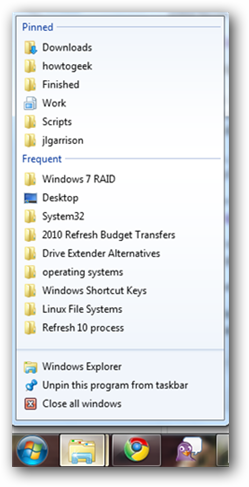
Win+1, 2, 3, 4, etc. will launch each program in your taskbar. It is helpful then to keep your most used programs at the beginning of your task bar so you can open them one right after another. This also works in Windows Vista for the quick launch icons.
Win+Alt+1, 2, 3, etc. will open the jump list for each program in the taskbar. You can then use your arrows to select which jump list option you want to open.
Win+T will cycle through taskbar programs. This is similar to just hovering over the item with your mouse but you can launch the program with Space or Enter.
Win+Home minimizes all programs except current the window.

Win+B selects the system tray which isn’t always useful but can come in very handy if your mouse stops working.
Win+Up/Down maximizes and restores down the current window so long as that window has the option to be maximized. It is exactly the same as clicking on the middle button on your windows.
Alt+Esc is like Alt+Tab but switches windows in the order they were opened and does not have the fancy window preview overlay.

Win+Pause/Break will open your system properties window. This can be helpful if you need to see the name of a computer or simple system statistics.
Ctrl+Esc can be used to open the start menu but will not work as a Windows key replacement for other shortcuts.

Ctrl+Shift+Esc will open the task manager without needing to hit Ctrl+Alt+Del first.
Alt+Space will open the window system menu which can be used to maximize (x), minimize (n), close (c), or move (m) the window which can be especially helpful if your window is somehow off-screen. This shortcut can also be helpful with windows that don’t close with the Alt+F4 shortcut such as the command window.

Windows Explorer Shortcuts

Here are handy shortcuts built into Windows Explorer which may have similar features in other programs too.

Alt+Up will navigate up one folder level since the up arrow on the menu bar was removed in Windows Vista. Alternatively, you can also make Backspace go up one folder level with a handy AutoHotKey script.

Shift+F10 opens the contextual or “right click” menu for a file/folder. This can be very handy for speed especially if you know which option you want to select. Look for an underlined letter in each option to know which letter you can press for faster access.
Shift+Del deletes a file without sending it to the recycle bin because who wants to empty their recycle bin anyway?

Ctrl+Shift+N creates a new folder in your current directory.

Alt+Enter opens the file properties so you can view file size, sharing settings, and creation date.
F2 renames a file or folder.

F3 will open explorer and select the search bar. If you already have an explorer window open it will highlight the search bar. In some programs it will also open the search dialog to search within that program.
F6 cycles objects in the current window. In explorer this will cycle between the location bar, options bar, left pane, and right pane. It also works with varying success in other programs. F10 toggles the file menu in explorer.

Have You Ever Wondered How Your Operating System Got Its Name?


Have you ever wondered what “XP” stands for or where “Ubuntu” comes from? Some operating systems get their names from obvious places, but others need some explaining. Read on to find out where your favorite OS got its name.
We’ve rounded up the most popular and well-known operating systems, as well as a few lesser-known ones—if you know of another operating system with an interesting story behind its name, make sure to teach your fellow readers in the comments.

MS-DOS


Micro Soft Disk Operating System (MS-DOS) was originally licensed from Seattle Consumer Products’ Quick and Dirty Operating System (QDOS). MS-DOS had no graphical user interface (GUI) and instead everything was inputted by users via a command prompt. The DOS acronym does not always mean MS-DOS. DOS is a generic term for “Disk Operating System” and MS-DOS was just one of many including Apple DOS, AmigaDOS, freeDOS, and many others.

Windows 1.0 – NT 4.0

The Windows name came from the fact that the new operating system, Windows 1.0, had windows a user could interact with in the GUI. The “Windows” name carries through all the way to current operating system and the number or name following “Windows” is how you can tell what version of Windows you have.

Microsoft stuck with the numbering scheme for 1.0-3.1 when it started to work on its New Technology (NT) branch of the operating system. Windows NT 4.0 was the first to implement the new NT kernel and was released in 1996 using the Windows 95 user interface.

Windows 95 – ME


Microsoft for a short while began naming their Windows operating system with the year of release indicating the version. Windows 95, 98, and Millennium Edition were all built off of the original Windows 3.1 kernel. Millennium Edition was release in 2000 and was designed to be used on home computers while Windows 2000 was designed for business computers.
Windows 2000 used the NT kernel and was the direct successor to NT 4.0, it was later replaced by Windows XP.

Windows XP, Vista, and Windows 7


Windows XP was released in 2001 and the XP stands for eXPerience. This experience lasted all the way until 2007 when Microsoft released Windows Vista. According to Microsoft, Vista got its name because “At the end of the day…what you’re trying to get to is your own personal Vista.” It was very philosophical of Microsoft but ultimately they moved to a more simple approach with Windows 7.
Windows 7 is the seventh version of Windows since 95. Even though 95 wasn’t the first version of Windows if you count 1.0 – 3.1, but Windows 10 just doesn’t have the same ring to it. Plus people might get it confused with Mac OS 10.

System 1 – 7.5

Apple’s System operating system was developed for the Macintosh personal computer. The operating system has always followed a basic revision numbering scheme with every major release getting a 1 point increment with minor updates getting a 0.1 increment.
The Apple Macintosh computer was released in 1984 and got its name from the McIntosh apple.

Each new version featured incremental updates and feature enhancements as well as support for newer Apple computers. System 1-4 had no multitasking support which may sound familiar to another Apple operating system.
The first seven versions of the operating system were simply called “System 1-7.” This held true until 7.6 when the word “System” was dropped in favor of a more marketable “Mac OS” name.

Mac OS 8 – 10


Mac OS 8 came out in 1997 shortly after Steve Jobs came back to work for Apple. Mac OS 8 was supposed to be called version 7.7 but was changed to 8 because of a legal loophole that allowed Apple to shut down the 3rd party Macintosh market.
Mac OS 9 is now known as the last of the “Classic” Mac OSs and was the final release to be based on Apple’s in house code.
OS X (OS Ten) is the tenth version of the Mac operating system and the first Mac OS based on Berkeley Software Distribution (BSD). The underlying OS was developed by the company Steve Jobs started while away from Apple, NeXTSTEP, which Apple acquired in 1997.

Each minor version of OS X (10.1, 10.2, etc.) also has an associated big cat name. While there is some speculation on where Apple got the idea for these names, it is a pretty big coincidence that the operating system would share names with the now depreciated Macintosh clones built by Shaye as well as a pretty convincing argument over OS X names and German tanks.

Linux

Linux itself got its name from Ari Lemmke who ran the FTP server the original Linux Kernel was uploaded to. Linus Torvalds, the creator of the Linux kernel, wanted to name the kernel Freax, but Ari instead gave him a folder called “linux” to upload his kernel to. The Linux name came from “Linus’ Minix” which was the operating system Linus was trying to replace for himself.

Ubuntu


Ubuntu (oo-BOON-too) comes from the Zulu and Xhosa languages in Africa roughly meaning “humanity towards others.”
Like many Linux distributions, Ubuntu releases have two names for every release, a development code name and a version name. The numerical name for the release is based on the year and month of the release, e.g., version 10.04 was released in April of 2010. Every two years a long term support (LTS) release is also made which carries the LTS lettering and also has an incremental release for bug fixes. The current long term support version is Ubuntu 10.04.2 LTS.
The code names are based on an alphabetical increment of an adjective and animal of the same letter. The animal naming came early in the development and usually reflects the state of the current Ubuntu distribution, e.g., Warty Warthog was the first release to signify its lack of polish. Ever release since Breeze Badger (5.10) has been in alphabetical order.
Ubuntu also has derivatives that have either a specific focus, location, or major difference in the operating system that requires a different distribution name. Some of the official derivatives are Kubuntu, Xubuntu, Mythbuntu, and Eubuntu. All of the official derivatives follow the same naming scheme as Ubuntu.
There are also Ubuntu customizations like Linux Mint, Linspire, and Ubuntulite which all have their own code names and version numbering.

Debian


Debian got its name from Ian Murdock the creator of the Debian distribution. He named the distribution after his girlfriend Debra Lynn by combining her name and his into “Debian.”
Each stable Debian release has an associated version number (1.0, 2.0, etc.), but it also has a code name based on a character from the movie 1995 movie Toy Story. The latest 6.0 release is named after the toy aliens “Squeeze.” The development branch of Debian is permanently named “Sid” from the emotionally unstable neighbor in the movie.

Red Hat/Fedora/CentOS


Red Hat Linux received its name because red hats have been the symbol of freedom and revolution in both the U.S. and France. Red Hat comes in a few different flavors, Red Hat Enterprise Linux (RHEL), Fedora Project, and CentOS
Red Hat Enterprise Linux does not use code names and instead just uses version numbers similar to OS X.
Fedora gets its name from the Red Hat logo in which Shadowman, the man in the logo, wears a red fedora hat. Fedora 1-6 were known as Fedora Core while later versions dropped “core” from the name.
Fedora uses code names that are relational to the previous release. Each release is related to the first with an “is-a” relationship to its predecessor. For example, version 7 “Moonshine” is a record label like version 6 “Zod”, but it is also a movie like version 8 “Werewolf.”
CentOS is the community-supported version of RHEL. The name comes from Community ENTerprise Operating System and is one of the most popular web server operating systems. Version numbers for CentOS follow RHEL version numbering and does not have code names.

Gentoo


Gentoo got its name from Daniel Robbins after renaming his Enoch Linux distribution. Gentoo was first renamed when Daniel and the other developers began using the EGCS compiler instead of the GCC compiler for added features and speed. Gentoo is named after the fastest swimming penguin, the Gentoo penguin.
The stylized “g” logo resembles a silver Japanese Magatama which were often found at grave sites as offerings to deities.

SuSE


SuSE is a German distribution which originally stood for “Software und System Entwicklung” which in English translates to “Software and System Development.” Since 1998 the acronym is no longer used and the the name of the company is simply SUSE.
The original release of SuSE Linux was version 4.2 instead of 1.0 in reference to the “Answer to the Ultimate Question of Life, the Universe, and Everything” from The Hitchhiker’s Guide to the Galaxy.
SUSE’s mascot is a Veiled chameleon named “Geeko” from the words “gecko” and “geek.”
SUSE is now owned by Novell and the free Linux distribution is known as openSUSE.